


If you spend more than an hour a day in the terminal, you know the pain of scrolling through a 10,000-line Docker build log trying to find a single stack trace. For decades, Linux developers have accepted that terminals are essentially infinite, dumb text buffers. You write a command, it spits out text, and if you lose your place, you start scrolling.
Warp fundamentally breaks that 40-year-old paradigm. Now that it has reached production-quality stability on Linux (with native .deb packages for Ubuntu and full Wayland/X11 support), it’s time to ask: is an “AI-native, GPU-accelerated” terminal actually worth abandoning your carefully curated .bashrc or zsh setup?
Let’s break down how Warp changes the daily Ubuntu development workflow, where it drastically cuts down debugging time, and where it falls completely flat.
The “Why vs. What” of Warp on Ubuntu
Warp isn’t a new shell; it’s a Rust-based terminal app that runs your existing zsh, bash, or fish underneath. But the way you interact with standard inputs and outputs is entirely different.
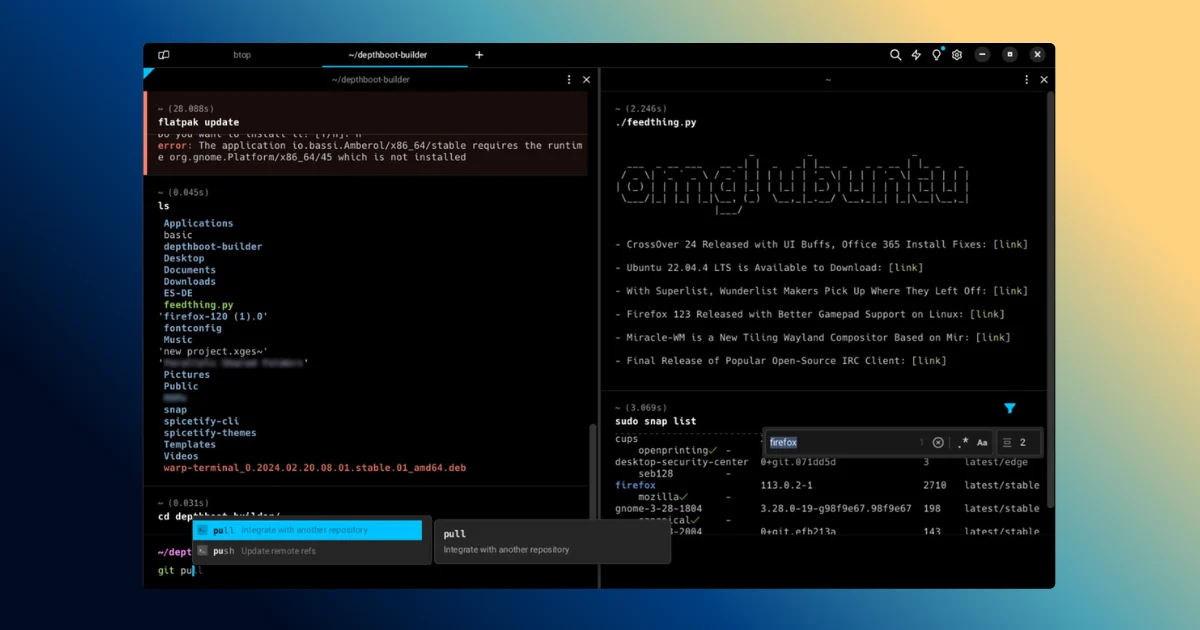
1. Block-Based Output
-
The What: Every command and its resulting output is grouped into a discrete, selectable UI element called a “block”.
-
The Why: When your Node.js app crashes or a CI pipeline fails, you don’t have to highlight text with your mouse and scroll up endlessly. You can jump block-by-block using
Cmd/Ctrl + Up, collapse verbose build outputs, or click a button to copy only the output of a specific command. This turns your terminal into a navigable notebook, saving massive amounts of time during incident debugging.
2. IDE-Style Command Input
-
The What: The prompt acts like a modern text editor with multi-line support, syntax highlighting, and mouse clicking.
-
The Why: Writing a complex
docker runor chainedawkcommand in a standard GNOME terminal usually involves agonizing arrow-key navigation. Warp lets you click anywhere in the command to edit, use multi-cursor selection, and spot syntax errors before you hit enter.
3. Built-In Agentic AI & MCP Servers
-
The What: Hitting `Ctrl + “ opens an AI assistant that understands your current directory and command history, and in 2026, Warp introduced first-class MCP (Model Context Protocol) server support and cloud agents (Oz).
-
The Why: Context-switching kills momentum. Instead of tabbing out to Stack Overflow to remember how to un-tar a specific file archive or find git branches merged 30 days ago, you type it in plain English. The AI generates the command and explains the flags before you run it.
Warp vs. The Traditional Stack
|
Feature |
Warp Terminal |
GNOME Terminal + Tmux |
|
Output Navigation |
Block-based, collapsible, easily shareable. |
Continuous text buffer; requires |
|
Performance |
GPU-accelerated (Vulkan/OpenGL 3.3+). |
CPU-rendered, lightweight. |
|
AI Integration |
Native; reads terminal context and exit codes. |
Requires third-party CLI tools or browser switching. |
|
Team Collaboration |
“Warp Drive” allows sharing workflows and command snippets. |
Relies on internal wikis or shared dotfiles. |
|
Best For |
Modern cloud, DevOps, and web developers. |
Server admins, extreme minimalists, and remote-first engineers. |
The Ugly: Where Warp Fails
I promised a candid review, and Warp is not without its flaws for the Linux power user.
First, Warp and tmux do not play well together. If your entire workflow relies on persistent tmux sessions for remote server work, Warp loses most of its block-based features inside that environment.
Second, the GPU acceleration comes at a cost. While it enables silky-smooth scrolling through heavy logs, the window transparency and blur effects can drain battery life and spike memory on older hardware. (Pro-tip: Disable window blur and trim your scrollback lines to 5,000 in the settings if you are on an older ThinkPad).
Finally, while the core UI is now open-source (under MIT and AGPL v3), the AI features operate on a metered model. The free tier gives you access to the AI, but you cannot bring your own API keys (like Claude or GPT-4) to bypass their backend limits natively.
The Verdict: Should You Install It?
If you are managing Docker containers, running database queries, or debugging complex local servers on Ubuntu, Warp is an absolute upgrade over standard terminal emulators. The time saved by the block-UI and the multi-line input editor alone makes it worth the download.
However, if you are a terminal purist who lives in tmux or requires an ultra-minimalist footprint, stick to Alacritty or Ghostty.
Download the official Warp .deb package for Ubuntu here
Affiliate Disclosure: This post contains affiliate links. If you purchase a premium subscription through these links, infodizest earns a commission at no additional cost to you. We only review and recommend tools that have been thoroughly tested in our live development environments.








Responses (0 )